





ConDoc 5.4 with landscaping and smarter tools
ConDoc 5.4 introduces smarter drawing tools, improved scene management, and new landscape workflows for more efficient work in SketchUp and LayOut.


The latest version of ConDoc Tools is now available! With ConDoc 5.4, the plugin introduces a powerful set of improvements that make your workflow in SketchUp and LayOut smoother, faster, and more organized: from smarter scene management to entirely new landscape tools.
LANDSCAPE Drawing Set
One of the biggest additions is the new LANDSCAPE drawing set, specially developed for landscape architects, designers, and site planners. This set includes all the drawing types needed from concept to execution, such as:
- Planting plans
- Irrigation and lighting plans
- Grading studies
- Hardscape plans
- 3D perspectives
New Scene Management Tools
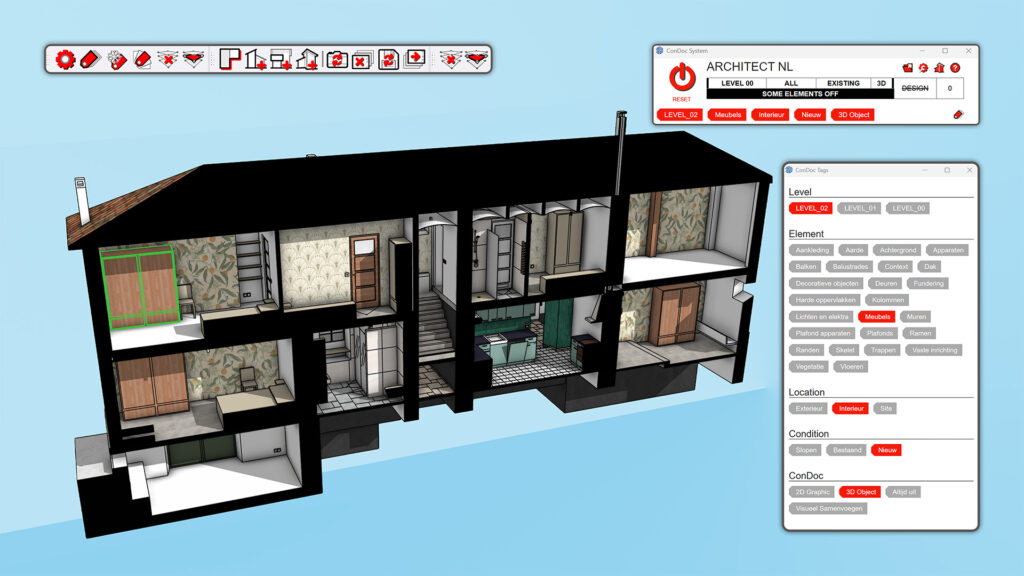
ConDoc 5.4 adds two useful features to the ConDoc Drawings toolbar:
- Update Drawing Camera: adjust the camera view and apply it to all related scenes with a single click.
- Delete ConDoc Drawings: easily remove drawings and all linked scenes.
- These tools save time on scene management and keep your model and LayOut drawings neatly organized.
Improvements in the ARCHITECT Drawing Set
The existing ARCHITECT drawing set has also been refined with:
- Better raster and vector tag control
- More consistent vegetation display
- Smarter and clearer tag names (like ELEMENT_Terrain and Building)
These improvements result in cleaner visuals and faster setup of plans and views.
Smarter Tagging & Plan Generation
- You can now assign multiple LEVEL and LOCATION tags to a single object — useful for elements spanning multiple levels.
- The Plan Generator detects existing scenes and asks whether to recreate or skip them, helping to avoid duplicates.
New Vegetation Components & Symbols
ConDoc 5.4 includes an updated set of 3D vegetation components and 2D symbols that provide faster and cleaner visual output. These graphics are optimized for performance and can also be used in architectural drawings.
Other Refinements
Several smaller enhancements have also been implemented, such as:
- The toolbar has been renamed to ConDoc Drawings
- Clearer tool names, descriptions, and tooltips
- Tighter formatting of warning dialogs
These refinements improve usability and make ConDoc easier to learn and more efficient for daily use.