





Gaussian Splats added to SketchUp LABS
Test the beta version of Gaussian Splats for SketchUp now.

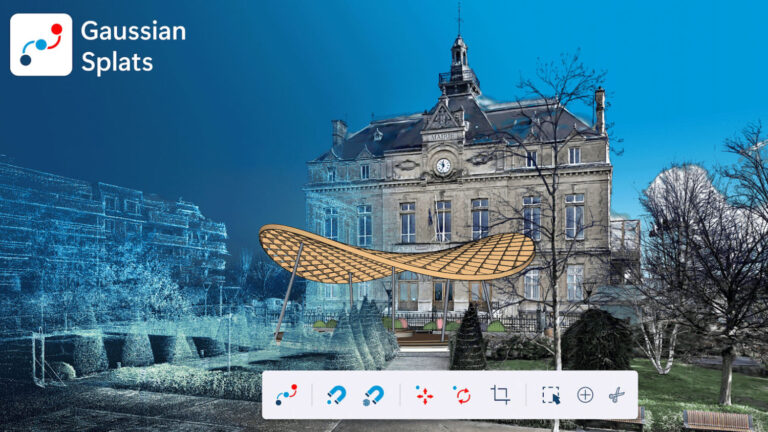
As a SketchUp distributor, we are thrilled to share the latest innovation from SketchUp Labs with you: Gaussian Splats! Following months of rigorous beta testing by the global community, Trimble has officially launched the Gaussian Splats extension as a public SketchUp Labs feature. This means you can dive in and start using it today.
What does this mean for your projects?
This groundbreaking technology allows you to bring the real world directly into your SketchUp designs. You can now place your SketchUp models into perfect, photorealistic 3D context, making it easier and more impressive than ever to design, review, and present your ideas.
While you will still generate the splats yourself using your favorite third-party 3D capture tools (such as Polycam, Luma, or Scaniverse), this new extension from Trimble offers a powerful suite of native tools to:
- Import directly: Load existing
.ply,.splat,.spz,.lcc, and.sklatfiles straight into SketchUp. - Edit smartly: Manipulate splats using familiar SketchUp commands or purpose-built tools to crop, align, and scale them perfectly to your site.
- Integrate seamlessly: Work flawlessly with SketchUp’s native Scenes and Section Planes. The visibility of your splats is even maintained in your 2D documentation using LayOut!
What exactly is a Gaussian Splat?
A “Gaussian Splat” is an innovative technique that transforms series of photographs into a photorealistic 3D environment. Unlike traditional, heavy point clouds, splats provide a much smoother, more natural, and highly realistic representation of reality.
How to get started right away:
You can install the extension yourself today:
- Open the Extension Warehouse inside SketchUp.
- Search for“Gaussian Splats” (or click here for a direct link).
- Download and install the newest version.
- Fully close and restart SketchUp to activate your new toolbar!
⚠️ System Requirements: Please note that Trimble has currently made the Gaussian Splats extension available exclusively for Windows users on the SketchUp Desktop client.
Pricing and Availability
Great news: for as long as this feature is part of the SketchUp Labs program, Trimble is offering it at no additional cost for all users with an active Pro, Pro Scan, Pro Advanced Workflows, or Studio subscription!
Help Trimble improve this feature!
Because this is a SketchUp Labs feature, end-user feedback is vital for its ongoing development. So dive right in, put the snapping and cropping tools to the test, and let Trimble know what you think on the official SketchUp forum!